
MTCRE Lab 1.9 - Recursive Next-Hop Resolution

Introduction
In simple routing scenarios, every gateway is in a directly connected subnet—you specify a next-hop IP that exists on one of your local interfaces, and the router forwards packets directly to that address. However, real-world networks often require more sophisticated configurations where the gateway for a route may itself be reachable only through another route, which may in turn require yet another routing lookup.
This process—recursive next-hop resolution—is fundamental to understanding how routers build forwarding decisions and is essential for working with advanced routing protocols like BGP, where next-hops are frequently not directly connected. MikroTik RouterOS provides fine-grained control over recursive resolution through the scope and target-scope parameters, allowing you to precisely define which routes can be used to resolve gateways.
In this lab, we explore multi-level recursive route resolution, understand how scope values control recursive lookup depth, learn how to use loopback addresses as stable next-hops, and troubleshoot common issues where routes remain inactive due to resolution failures. You'll configure recursive routes, manipulate scope parameters, and observe how RouterOS chains route lookups to determine the actual next-hop interface.
By the end of this lab, you'll have a deep understanding of how RouterOS resolves gateways and how to design routing configurations that leverage recursion effectively.
Terminology Definitions
Recursive Route Resolution: The process by which a router determines the actual next-hop interface for a route when the configured gateway is not directly connected, requiring one or more additional routing table lookups.
Scope: A numeric value (0-255) assigned to each route that indicates its "level" in the routing hierarchy. Connected routes typically have scope=10, static routes have scope=30, and BGP routes often have scope=40.
Target Scope: The maximum scope value that a route will consider when performing recursive gateway resolution. If the only route to reach a gateway has scope greater than the target-scope, the resolution fails and the route remains inactive.
Immediate Gateway: The final resolved next-hop IP and interface after all recursive lookups are complete, displayed in route details as immediate-gw=IP%interface or immediate-gw=IP@intermediate-IP%interface for recursive routes.
Recursive Chain: The sequence of routes used to resolve a gateway, where each route in the chain points to the next until a directly connected route is reached.
Resolution Depth: The number of recursive lookups required to resolve a gateway to a directly connected next-hop. RouterOS supports multiple levels of recursion.
Loopback Next-Hop: Using a loopback interface IP address as a gateway, which requires recursive resolution but provides stability since loopback interfaces don't depend on physical link state.
Scope Hierarchy: The relationship between different route types based on their scope values, with lower scopes considered "more connected" and preferred for recursive resolution.
Resolution Failure: When RouterOS cannot find a valid route within the target-scope to reach a configured gateway, causing the route to remain inactive.
Lab Topology
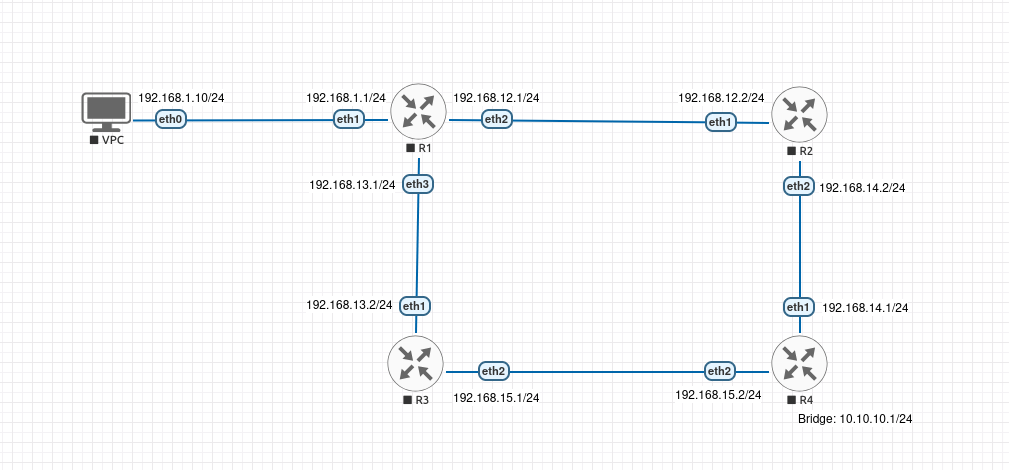
Prerequisites and Starting Configuration
For this lab, we'll add loopback interfaces to each router to demonstrate stable next-hop addresses for recursive resolution.
Complete Starting Configuration
Configure VPC:
set pcname VPC1
ip 192.168.1.10 255.255.255.0 192.168.1.1
save
Configure R1:
/system identity set name=R1

# Create loopback interface
/interface bridge add name=loopback comment="Loopback interface"
/ip address add address=1.1.1.1/32 interface=loopback comment="R1 loopback"

/ip address
add address=192.168.1.1/24 interface=ether1 comment="to VPC"
add address=192.168.12.1/24 interface=ether2 comment="to R2"
add address=192.168.13.1/24 interface=ether3 comment="to R3"

# Static routes
/ip route
add dst-address=10.10.10.0/24 gateway=192.168.12.2 comment="to R4 via R2"
add dst-address=2.2.2.2/32 gateway=192.168.12.2 comment="to R2 loopback"
add dst-address=3.3.3.3/32 gateway=192.168.13.2 comment="to R3 loopback"
add dst-address=4.4.4.4/32 gateway=192.168.12.2 comment="to R4 loopback via R2"
Configure R2:
/system identity set name=R2

# Create loopback interface
/interface bridge add name=loopback comment="Loopback interface"
/ip address add address=2.2.2.2/32 interface=loopback comment="R2 loopback"

/ip address
add address=192.168.12.2/24 interface=ether1 comment="to R1"
add address=192.168.14.2/24 interface=ether2 comment="to R4"

/ip route
add dst-address=10.10.10.0/24 gateway=192.168.14.1 comment="to R4 loopback network"
add dst-address=192.168.1.0/24 gateway=192.168.12.1 comment="return to VPC"
add dst-address=1.1.1.1/32 gateway=192.168.12.1 comment="to R1 loopback"
add dst-address=3.3.3.3/32 gateway=192.168.14.1 comment="to R3 loopback via R4"
add dst-address=4.4.4.4/32 gateway=192.168.14.1 comment="to R4 loopback"
Configure R3:
/system identity set name=R3

# Create loopback interface
/interface bridge add name=loopback comment="Loopback interface"
/ip address add address=3.3.3.3/32 interface=loopback comment="R3 loopback"

/ip address
add address=192.168.13.2/24 interface=ether1 comment="to R1"
add address=192.168.15.1/24 interface=ether2 comment="to R4"

/ip route
add dst-address=10.10.10.0/24 gateway=192.168.15.2 comment="to R4 loopback network"
add dst-address=192.168.1.0/24 gateway=192.168.13.1 comment="return to VPC"
add dst-address=1.1.1.1/32 gateway=192.168.13.1 comment="to R1 loopback"
add dst-address=2.2.2.2/32 gateway=192.168.15.2 comment="to R2 loopback via R4"
add dst-address=4.4.4.4/32 gateway=192.168.15.2 comment="to R4 loopback"
Configure R4:
/system identity set name=R4

# Create loopback interface
/interface bridge add name=loopback comment="Loopback interface"
/ip address add address=4.4.4.4/32 interface=loopback comment="R4 loopback"

/ip address
add address=192.168.14.1/24 interface=ether1 comment="to R2"
add address=192.168.15.2/24 interface=ether2 comment="to R3"

# Create loop10 bridge for destination network
/interface bridge add name=loop10 comment="Destination 10.10.10.0/24"
/ip address add address=10.10.10.1/24 interface=loop10 comment="Destination network"

/ip route
add dst-address=192.168.1.0/24 gateway=192.168.14.2 comment="to VPC via R2"
add dst-address=192.168.12.0/24 gateway=192.168.14.2 comment="to R1-R2 link"
add dst-address=192.168.13.0/24 gateway=192.168.15.1 comment="to R1-R3 link"
add dst-address=1.1.1.1/32 gateway=192.168.14.2 comment="to R1 loopback"
add dst-address=2.2.2.2/32 gateway=192.168.14.2 comment="to R2 loopback"
add dst-address=3.3.3.3/32 gateway=192.168.15.1 comment="to R3 loopback"
Verification:
Verify basic connectivity from VPC:
ping 10.10.10.1 -c 4
From R1, verify you can ping the loopback addresses:
/ping 2.2.2.2 count=4
/ping 3.3.3.3 count=4
/ping 4.4.4.4 count=4
All pings should succeed.
Lab Exercises: Recursive Route Resolution in Depth
Step 1: Basic Recursive Route
Let's create a simple recursive route on R1 where the gateway is not directly connected.
On R1, add a route using R4's loopback as the gateway:
/ip route add dst-address=172.16.0.0/16 gateway=4.4.4.4 comment="Recursive via R4 loopback"
This route specifies 4.4.4.4 as the gateway, but 4.4.4.4 is not in any directly connected subnet on R1. RouterOS must recursively resolve it.
View the route in detail:
/ip route print detail where comment="Recursive via R4 loopback"
You should see the route is INACTIVE (no "A" flag):
 0  s  ;;; Recursive via R4 loopback
        dst-address=172.16.0.0/16 routing-table=main gateway=4.4.4.4
        immediate-gw="" distance=1 scope=30 target-scope=10
Why is the route inactive?
Even though R1 has a route to 4.4.4.4/32 via 192.168.12.2, the recursive resolution fails because:
- The route to 4.4.4.4/32 is a static route with scope=30
- By default, static routes have target-scope=10
- target-scope=10 means "only use routes with scope ≤10 for gateway resolution"
- Since 30 > 10, the route to 4.4.4.4 cannot be used, and resolution fails
- Result: immediate-gw is empty and the route stays inactive
Fix it by adjusting target-scope:
/ip route set [find comment="Recursive via R4 loopback"] target-scope=30
Now check the route again:
/ip route print detail where comment="Recursive via R4 loopback"
The route should now be ACTIVE:
 0 As  ;;; Recursive via R4 loopback
        dst-address=172.16.0.0/16 routing-table=main gateway=4.4.4.4
        immediate-gw=192.168.12.2%ether2 distance=1 scope=30 target-scope=30
Key observations:
- gateway=4.4.4.4: The configured gateway (R4's loopback)
- immediate-gw=192.168.12.2%ether2: Recursive resolution result
- target-scope=30: Now allows using routes with scope ≤30 (including static routes) for gateway resolution
- The route is now active because it can use the scope=30 static route to 4.4.4.4
Step 2: Understanding the Recursive Chain
Let's trace through exactly what RouterOS does to resolve the gateway:
- R1 wants to forward a packet to 172.16.1.1 (in 172.16.0.0/16)
- Routing table says: use gateway 4.4.4.4
- R1 asks: "How do I reach 4.4.4.4?"
- Routing table says: "4.4.4.4/32 is reachable via 192.168.12.2"
- R1 asks: "How do I reach 192.168.12.2?"
- Routing table says: "192.168.12.0/24 is directly connected on ether2"
- Resolution complete: Forward to 192.168.12.2 via ether2
View all routes involved in this chain:
/ip route print detail where dst-address~"172.16|4.4.4.4|192.168.12.0"
Step 3: Scope Values and Route Types
Let's examine the scope values of different route types.
View all routes with their scope values:
/ip route print detail
Observe the scope values:
- Connected routes (interfaces): scope=10
- Static routes: scope=30
- Dynamic routes (if using OSPF/BGP): scope=40
The target-scope parameter defines which of these can be used for gateway resolution:
- target-scope=10: Only connected routes (default for static routes)
- target-scope=30: Connected + static routes
- target-scope=40: Connected + static + dynamic routes
Step 4: Demonstrating Scope Failure
Create a route that will fail to activate due to target-scope restrictions.
On R1, add a route with very restrictive target-scope:
/ip route add dst-address=172.18.0.0/16 gateway=4.4.4.4 target-scope=5 comment="Scope failure demo"
Check this route:
/ip route print where comment="Scope failure demo"
The route will be INACTIVE (no "A" flag) because:
- To reach 4.4.4.4, R1 needs the route with dst-address=4.4.4.4/32
- That route has scope=30
- But target-scope=5 means "only use routes with scope ≤5"
- Resolution fails!
Fix it by adjusting target-scope:
/ip route set [find comment="Scope failure demo"] target-scope=30
The route should now become active.
Step 5: Using Loopback Addresses for Stability
One of the primary reasons for using recursive routes with loopback addresses is stability. Loopback interfaces remain up as long as the router is running, regardless of physical link states.
First, create a destination network on R2 that we can reach:
On R2:
/interface bridge add name=loop20 comment="Test network 172.20.0.0/16"
/ip address add address=172.20.1.1/24 interface=loop20 comment="Destination for stability test"
On R1, create two routes to the same destination—one using R2's physical interface IP, one using R2's loopback:
/ip route add dst-address=172.20.0.0/16 gateway=192.168.12.2 distance=1 check-gateway=ping comment="Via R2 physical IP"
/ip route add dst-address=172.20.0.0/16 gateway=2.2.2.2 distance=2 target-scope=30 check-gateway=ping comment="Via R2 loopback IP"
Important notes:
- The loopback route needs
target-scope=30because it must recursively resolve through the static route to 2.2.2.2 - Both routes use
check-gateway=pingto actively verify the gateway is reachable, not just routable - Without
check-gateway=ping, RouterOS only checks if the gateway is in a reachable subnet, not if it actually exists
View routes to 172.20.0.0/16:
/ip route print where dst-address=172.20.0.0/16
The physical IP route (distance=1) is active, the loopback route (distance=2) is backup.
Verify connectivity:
/ping 172.20.1.1 count=4
The ping should succeed using the active route via 192.168.12.2.
Now simulate R2 changing its physical IP (perhaps during maintenance). On R2:
/ip address set [find comment="to R1"] address=192.168.12.100/24
On R1, try to ping the destination:
/ping 172.20.1.1 count=4
You should see "network unreachable" because:
- With
check-gateway=ping, RouterOS actively pings 192.168.12.2 and discovers it doesn't respond - The route via 192.168.12.2 becomes inactive (gateway unreachable)
- The backup route via 2.2.2.2 also becomes inactive (the route to 2.2.2.2 was via 192.168.12.2, which is now unreachable)
Check the routes:
/ip route print where dst-address~"172.20|2.2.2.2"
Both routes should be inactive. The routes show "unreachable" status because check-gateway=ping detected that the gateways don't respond.
Why check-gateway=ping is important:
- Without it, RouterOS only checks if the gateway is in a connected subnet
- 192.168.12.2 is still in the 192.168.12.0/24 subnet, so the route would stay "active" even though the IP doesn't exist
- With
check-gateway=ping, RouterOS actively verifies the gateway responds before considering the route usable
Return R2's IP to normal:
On R2:
/ip address set [find comment="to R1"] address=192.168.12.2/24
On R1, verify connectivity is restored:
/ping 172.20.1.1 count=4
The ping should succeed again.
Check the route status:
/ip route print detail where dst-address=172.20.0.0/16
You should see:
- Primary route (distance=1): Shows "A" flag (Active) - this route is being used
- Backup route (distance=2): No "A" flag, but gateway is reachable - route is ready as backup
Important: The backup route won't show as "Active" when the primary route is working. Only the best route (lowest distance) is marked Active. The backup route is still present, reachable, and ready to take over if the primary fails - it just doesn't have the "A" flag because it's not currently being used for forwarding.
Clean up the test network:
On R2:
/ip address remove [find comment="Destination for stability test"]
/interface bridge remove loop20
Step 6: Preventing Recursion Loops
RouterOS protects against infinite recursion loops. Let's try to create one.
On R1:
/ip route add dst-address=5.5.5.5/32 gateway=6.6.6.6 target-scope=30 comment="Loop part 1"
/ip route add dst-address=6.6.6.6/32 gateway=5.5.5.5 target-scope=30 comment="Loop part 2"
Check these routes:
/ip route print where comment~"Loop part"
Both routes will be INACTIVE because:
- To reach 5.5.5.5, need route to 6.6.6.6
- To reach 6.6.6.6, need route to 5.5.5.5
- Circular dependency!
RouterOS detects this and refuses to activate either route.
Remove these test routes:
/ip route remove [find comment~"Loop part"]
Step 7: Practical Application - BGP Next-Hop Simulation
In BGP, next-hops are often loopback addresses of remote routers. Let's simulate this.
First, update the existing route to 4.4.4.4 to include gateway checking:
On R1:
/ip route set [find dst-address=4.4.4.4/32] check-gateway=ping
Now add a simulated BGP route for 203.0.113.0/24 with next-hop 4.4.4.4 (R4's loopback):
/ip route add dst-address=203.0.113.0/24 gateway=4.4.4.4 target-scope=30 check-gateway=ping comment="Simulated BGP route"
This route will be active because:
- R1 has a route to 4.4.4.4/32 via 192.168.12.2 (scope=30)
- target-scope=30 allows using that route
- Recursion succeeds
- check-gateway=ping verifies 4.4.4.4 is reachable
Why check-gateway=ping matters here:
- When R2's interface goes down, the connected route on R1's ether2 stays up (interface is still up on R1's side)
- Without check-gateway, routes to 192.168.12.2 would stay "active" even though the gateway is unreachable
- With check-gateway=ping, RouterOS detects the failure and marks routes as inactive
Test this by disabling R2's interface toward R1:
On R2:
/interface disable ether1
After a few seconds, check R1:
/ip route print where dst-address~"203.0.113|4.4.4.4"
Both routes should be inactive now (no path to R2, so no path to 4.4.4.4, so no next-hop for 203.0.113.0/24).
Re-enable the interface:
/interface enable ether1
Both routes should become active again.
Step 8: Cleanup
Remove all test routes:
/ip route remove [find comment~"Recursive|Scope failure|Via R2|Simulated BGP"]
/ip route remove [find dst-address~"172.16|172.18|172.20|203.0.113"]
Summary
In this lab, you explored recursive next-hop resolution in depth, learning how MikroTik RouterOS resolves gateways through multiple levels of routing table lookups.
Key takeaways from this lab:
- Recursive Resolution: When a gateway is not directly connected, RouterOS performs recursive lookups to find the actual next-hop interface
- Scope Values: Different route types have different scope values (connected=10, static=30, dynamic=40)
- Target Scope: The target-scope parameter controls which routes can be used for gateway resolution based on their scope values
- Immediate Gateway Display: The
immediate-gwfield shows the final resolved next-hop - Loopback Stability: Using loopback addresses as next-hops provides stability independent of physical link states
- Loop Prevention: RouterOS detects and prevents circular recursion dependencies
- BGP Application: Recursive resolution is essential for BGP where next-hops are typically loopback addresses of remote routers
For MTCRE candidates, understanding recursive route resolution is critical for working with advanced routing protocols, especially BGP where iBGP next-hops are almost always loopback addresses requiring recursion. The ability to control recursion depth through target-scope gives you precise control over routing behavior and helps troubleshoot why routes may remain inactive.
This knowledge forms the foundation for understanding how route reflectors work, how BGP next-hop-self affects recursion, and how to design scalable routing architectures in large networks.
Knowledge Check Questions
Question 1: You configure /ip route add dst-address=10.99.0.0/16 gateway=172.16.50.1 on a MikroTik router. There is a static route to 172.16.50.0/24 via 192.168.1.254 with scope=30. The route to 10.99.0.0/16 appears in the routing table but is not active. What is the most likely cause?
A) The distance value is too high
B) The target-scope (default 10) doesn't allow using the scope=30 route for recursion
C) The gateway 172.16.50.1 is not responding to pings
D) ECMP is preventing the route from activating
Click to reveal answer
Answer: B - The target-scope doesn't allow using the scope=30 route for recursion
Explanation: Static routes in RouterOS have a default target-scope of 10, which means they will only use routes with scope ≤10 for resolving gateways. Connected routes have scope=10, which is why most static routes work (gateway in a local subnet). However, this is a recursive route—the gateway 172.16.50.1 is not locally connected and requires another static route (scope=30) to be reached. Since 30 > 10, the recursion fails and the route remains inactive. The solution is to explicitly set target-scope=30 (or higher) in the route configuration to allow recursion through static routes.
Question 2: You configure a static route /ip route add dst-address=172.16.0.0/16 gateway=4.4.4.4 target-scope=30 on R1. When you run /ip route print detail, you see immediate-gw=192.168.12.2%ether2. What does this indicate?
A) The route is using ECMP with two gateways: 192.168.12.2 and ether2
B) The gateway 4.4.4.4 was recursively resolved to 192.168.12.2 on interface ether2
C) The route has failed and ether2 is the backup interface
D) The route's distance metric is 2
Click to reveal answer
Answer: B - The gateway 4.4.4.4 was recursively resolved to 192.168.12.2 on interface ether2
Explanation: The immediate-gw field shows the actual next-hop IP and interface after recursive resolution is complete. The configured gateway is 4.4.4.4 (not directly connected), so RouterOS performed a routing table lookup to find how to reach 4.4.4.4. It found a route to 4.4.4.4/32 via 192.168.12.2, which is in the directly connected subnet 192.168.12.0/24 on ether2. The format IP%interface indicates single-level recursion where the configured gateway was resolved to a directly reachable next-hop. This is different from multi-level recursion which would show multiple @ symbols.
Question 3: You want to configure a static route that can use other static routes for recursive gateway resolution, but NOT dynamic routes from OSPF. Which target-scope value should you use?
A) target-scope=10
B) target-scope=20
C) target-scope=30
D) target-scope=40
Click to reveal answer
Answer: C - target-scope=30
Explanation: Scope values in RouterOS are: connected routes = 10, static routes = 30, dynamic routes (OSPF, BGP, etc.) = 40. The target-scope parameter defines the maximum scope value a route can have to be considered for gateway resolution. Setting target-scope=30 allows the route to use routes with scope ≤30, which includes connected routes (10) and static routes (30), but excludes dynamic routes (40). If you used target-scope=40 (option D), it would also allow OSPF routes. If you used target-scope=10 (option A), it would only allow connected routes, preventing recursion through static routes.
Question 4: What is the primary advantage of using a router's loopback IP address as a gateway in recursive routes instead of using a physical interface IP?
A) Loopback addresses provide faster routing lookups
B) Loopback interfaces remain up regardless of physical link states, providing stable next-hops
C) Loopback addresses use less memory in the routing table
D) Loopback routes automatically load-balance across all available paths
Click to reveal answer
Answer: B - Loopback interfaces remain up regardless of physical link states
Explanation: Loopback interfaces are virtual interfaces that remain active as long as the router itself is running, independent of any physical link states. When you use a loopback IP as a gateway, the route remains valid even if the physical path to reach that router changes (due to link failures, path changes, etc.). This is especially important in BGP configurations where routers establish peering sessions using loopback addresses—if physical IPs changed or interfaces went down, the BGP session would reset, but using loopbacks provides stability. The routing protocol (or recursive static routes) handles finding the current best path to reach the loopback address. Options A, C, and D are not accurate characteristics of loopback-based recursion.